
The world of 3D printing design software is vast, offering a variety of options that cater to different skill levels, project requirements, and budget constraints. Free software options are often designed to be user-friendly and accessible, making them ideal for beginners or those on a tight budget. These programs, such as Tinkercad and Blender, provide essential tools and features that allow users to create basic to moderately complex designs. They serve as a great starting point for individuals looking to explore 3D printing without a significant financial investment.
Introduction To 3D Printing Design Software
3D printing design software serves as the bridge between an idea and its physical manifestation. These programs enable users to create, modify, and optimize 3D models before they are sent to a 3D printer. The software can range from basic applications that offer simple modeling tools to comprehensive suites that include a wide array of advanced features. Understanding the basics of 3D printing design software is essential for anyone looking to delve into the world of 3D printing, as it directly affects the quality and feasibility of printed objects.
Benefits Of Using 3D Printing Design Software
Utilizing 3D printing design software offers numerous benefits that enhance the overall design and manufacturing process. One of the most significant advantages is the ability to create highly detailed and accurate models. The precision offered by these tools ensures that the final printed product closely matches the original design intent. Additionally, 3D printing design software allows for easy modification and iteration of designs, enabling rapid prototyping and reducing the time needed to develop new products.
Comparison: Free VS Paid 3D Printing Design Software
When deciding between free and paid 3D printing design software, it's essential to consider the specific needs of your project and your level of expertise. Free software is an excellent choice for beginners or those working on simple projects. Programs like FreeCAD and OpenSCAD provide robust basic tools without any financial investment. These tools are ideal for learning the basics of 3D modeling and for creating straightforward designs.
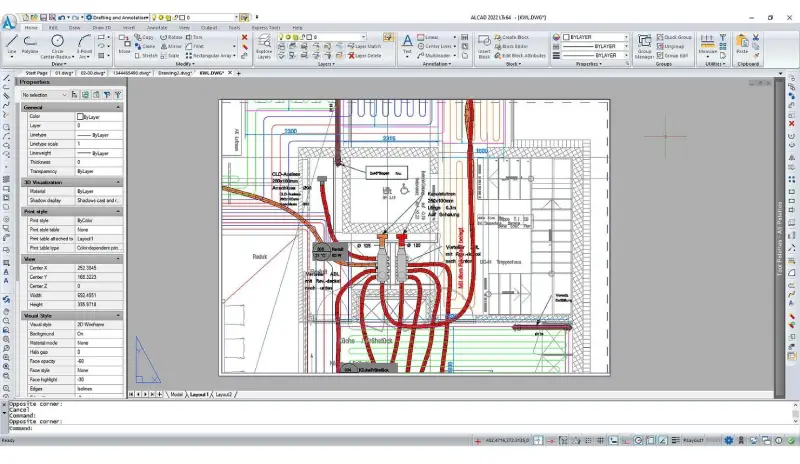
Paid software, however, offers advanced features that can be crucial for professional and complex projects. Software like Siemens NX or AutoCAD includes sophisticated tools for parametric design, advanced simulation, and comprehensive support services. These features allow for greater precision, efficiency, and versatility in design. Additionally, paid software often comes with better customer support and regular updates, ensuring that users have access to the latest features and improvements. While the cost of paid software can be a barrier, the enhanced capabilities and support can justify the investment for serious users.
Key Features To Look For In 3D Printing Design Software
Selecting the right 3D printing design software involves evaluating the features that are most important for your specific needs. One critical feature is the ease of use and learning curve. Software with an intuitive interface and comprehensive tutorials can significantly reduce the time required to become proficient. Additionally, look for software that offers a wide range of modeling tools, including parametric and freeform modeling, to provide flexibility in design creation.
Another essential feature is compatibility with various file formats and 3D printers. Ensure that the software supports standard file formats like STL, OBJ, and AMF, which are commonly used in 3D printing. Advanced features such as simulation and analysis tools are also valuable, as they allow for the testing of designs under different conditions and the optimization of models for strength, weight, and material usage. Collaborative features, such as cloud-based sharing and version control, can also enhance productivity, especially for team projects.
User Interface And Learning Curve Considerations
The user interface (UI) and learning curve of 3D printing design software are crucial factors that influence how quickly and efficiently users can create and modify designs. Software with a clean, intuitive UI and comprehensive tutorials can greatly enhance the user experience, making it easier for beginners to get started and for experienced users to work more efficiently. Tools like Tinkercad are known for their user-friendly interfaces, which make them ideal for those new to 3D modeling.
In contrast, more advanced software like SolidWorks or Rhino may have a steeper learning curve due to their extensive features and capabilities. However, these programs often provide a wealth of resources, including online tutorials, forums, and customer support, to help users overcome initial challenges. When selecting 3D printing design software, consider your own experience level and the time you can dedicate to learning new tools. A program that balances ease of use with advanced functionality will provide the best long-term value.
Compatibility With Different 3D Printers And File Formats
Ensuring compatibility between your 3D printing design software and your 3D printer is vital for a smooth workflow. Most 3D printing design software supports standard file formats which are widely accepted by various 3D printers. However, it's important to verify that the software you choose can export files in a format compatible with your specific printer model to avoid any issues during the printing process.
Additionally, consider the software's ability to work with different types of 3D printers, such as FDM, SLA, and SLS. Some software is optimized for specific printer types and can offer features tailored to their unique requirements. Ensuring that your design software and 3D printer are compatible will help streamline the process from design to final print, minimizing errors and ensuring high-quality results. Advanced software may also provide specific settings and optimizations for different printers, enhancing the overall printing experience.
Advanced Design Tools And Capabilities
For those looking to push the boundaries of what is possible with 3D printing, advanced design tools and capabilities are essential. High-end 3D printing design software offers a range of features that cater to complex and intricate designs. These tools include parametric modeling, which allows designers to define specific parameters and constraints, enabling easy modifications and precise control over the final model. Other advanced capabilities may include simulation tools for stress analysis, thermal analysis, and fluid dynamics, which help in optimizing designs for real-world applications.
Furthermore, some software offers generative design features that use algorithms to create optimized structures based on specific criteria such as weight, strength, and material usage. These capabilities are particularly useful in industries like aerospace and automotive, where performance and efficiency are critical. Advanced rendering and visualization tools also enhance the design process by providing realistic previews of the final product, helping designers to identify potential issues and make informed decisions before printing.
Conclusion
The landscape of 3D printing design software is rich and varied, offering tools for everyone from beginners to seasoned professionals. Whether you opt for a free program to start your journey or invest in a paid solution for advanced projects, the right software can significantly enhance your design capabilities and streamline your workflow. Understanding the benefits, key features, and considerations of different software options will help you make an informed decision that aligns with your specific needs and goals. As 3D printing technology continues to evolve, staying updated with the latest software advancements will ensure that you can fully leverage the potential of this transformative technology.